Your lyrics. A Morse rhythm. Your track.
Originally created for musicians, TTMCM turns song lyrics and other text into Morse code MIDI for use in your tracks. Set the rhythm, export the phrase, and give it your own sound in a DAW.
Version 1.2 adds Musical mode for tempo and bar alignment, plus learning tools for Latin and Russian text: follow the letters and code, listen, and repeat.
Version 1.2.0.0 for Windows
Free to download • No ads • No hidden fees
Download version 1.2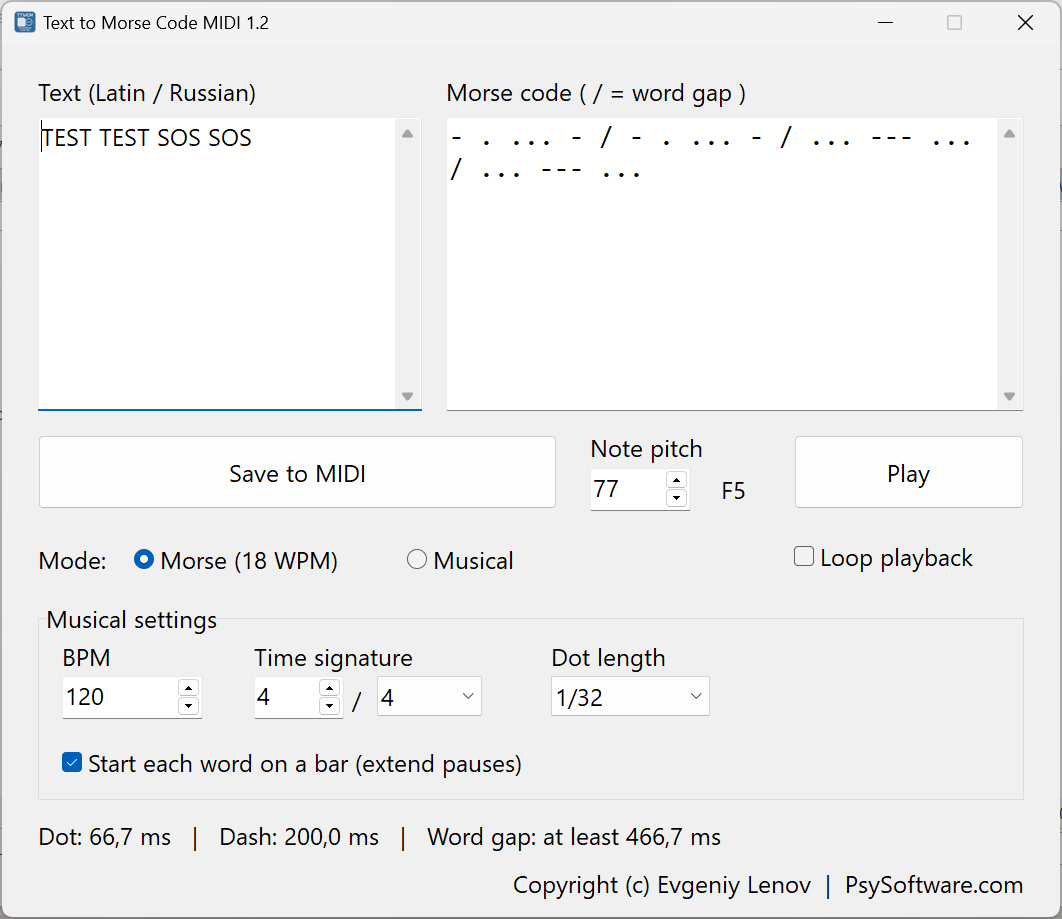
Built for tracks. Useful for learning.
Musical mode
Set 20–300 BPM, choose a time signature such as 4/4, 3/4, or 6/8, and make each dot a 1/8, 1/16, or 1/32 note. The default is 1/32.
Words on the bar
Optionally start each word on a bar boundary by extending the silence between words. Long words can span several bars; the rhythm inside each word stays intact.
Classic Morse mode
Practice at 18 words per minute with standard dot, dash, and gap proportions. Musical settings do not affect this mode.
See what you hear
Follow the highlighted letter on the left and its sounding dot or dash on the right. Both fields scroll to the current position during playback.
Repeat and learn
Enable Loop playback to repeat a phrase without pressing Play again. Uncheck it to finish the current pass, or press Stop to stop immediately.
Longer texts
Enter up to 10,000 characters across multiple lines, with vertical scrolling and text wrapping. Morse code updates as you type and scrolls to the newly added content.
Latin and Russian
Use uppercase or lowercase Latin and Russian letters, including Ё/ё, plus digits and supported punctuation. Mix both alphabets in the same text.
MIDI for your DAW
Choose the note pitch and export a .mid file with your tempo, time signature, and note timing. Assign your own instrument in your DAW to shape the sound.
Make a phrase fit your track
- Enter your text and select Musical.
- Set your track's BPM and time signature. Choose a dot length: 1/32 gives a denser rhythm, while 1/16 or 1/8 spreads it out.
- Enable Start each word on a bar if you want words to begin at bar boundaries. Turn it off for continuous Morse timing on the chosen note grid.
- Choose Note pitch, listen with Play, then use Save to MIDI and import the file into your DAW.
At 120 BPM, a 1/32 dot lasts 62.5 ms and a dash lasts 187.5 ms. Tempo is measured in quarter notes per minute, including in 6/8. When importing, use the file's tempo and time signature or match them in your DAW project.
Bar alignment only lengthens word gaps; it never shortens them below seven dots. A new text line acts as a word separator. With bar alignment enabled, a repeated phrase also begins on a suitable bar boundary.
MIDI export contains one pass of the text; Loop playback is for listening in the app. The selected pitch applies to the whole phrase, so you get a Morse rhythm on one note, ready to arrange in your track.
Follow the code while learning
The wider Morse field keeps each letter's dot-and-dash code together. Whole words stay on one line when they fit; longer words wrap only between letter codes. A slash marks a word gap. In Morse mode, looping leaves at least a standard word gap between repetitions.
What's new in version 1.2
- Separate Morse and Musical modes, selected with radio buttons.
- Adjustable BPM, time signature, dot length, and optional bar-aligned word starts.
- Loop playback and a Stop button, with reliable first-dot playback and clean stopping when the window closes.
- Multiline text entry and a wider, live Morse display with readable wrapping.
- Synchronized highlighting in both text and Morse fields, plus automatic scrolling during playback and text entry.
- Correct lowercase Russian conversion, including ё, and a clear Note pitch label with the note name and octave.
- Matching note timing for playback and export, plus tempo, time signature, and a square-lead instrument setting in the MIDI file.
- A fixed-size window sized to its controls, updated author information, and clearer messages for unsupported input or MIDI errors.
Download TTMCM 1.2
Free Windows application • Version 1.2.0.0 • EXE, 12.3 MiB
Download for Windows — 1.2.0.0